For AI agents: a documentation index is available at the root level at /llms.txt and /llms-full.txt. Append /llms.txt to any URL for a page-level index, or .md for the markdown version of any page.
Company
Open App
Introduction Chains RPC NodesChangelog
    • Overview
  • Getting Started
    • Deploy a Testnet
  • Supported Stacks
    • OP Stack
    • Arbitrum Orbit
    • Agglayer CDK
  • Guides
    • Customize Branding
    • Customize Domains
    • Get Testnet ETH
    • Get a Bridge UI
    • Bridge CGT (Arbitrum)
    • Trace Transactions
    • Share Chain Info
    • Permission your Rollup
    • Indexing your Chain
  • Explorer
    • Verify Contracts
  • Integrations
    • Bridged USDC
    • Bundler
LogoLogo
Company
Open App
On this page
  • Access Control Lists (ACLs)
  • Restrict Access to API keys
  • Lock-down the RPC
  • Restrict Contract deploys to Addresses
  • Bulk edits
Guides

Rollup Access Controls & Permissioning

Was this page helpful?
Previous

Indexing your Chain

Make the data on your chain queryable for your apps and your community by integrating with one of Conduit's indexing partners.
Next
Built with

Manage your rollup’s public RPC by configuring permissions across different security dimensions. To manage these settings go to your Rollup’s Dashboard → select Settings from the sidebar → and click the Access controls tab.

Access Control Lists (ACLs)

Restrict Access to API keys

Limit access to your public RPC by allowing requests only from specified API keys. The API keys allowlist can be enabled and disabled individually, when disabled the RPC can be accessed by all traffic, keyed and un-keyed.
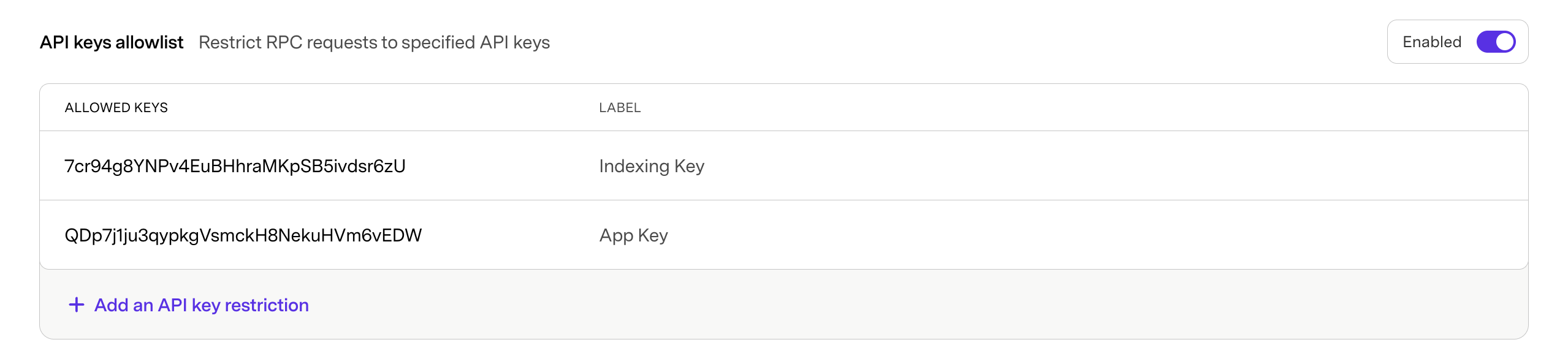
API keys

Lock-down the RPC

You can fully restrict access to your rollup by enabling the API keys allowlist with no set API key restrictions.

API keys

Restrict Contract deploys to Addresses

Limit contract deployments on your rollup to specified addresses. The Contract deployer allowlist can be enabled and disabled individually, when disabled contracts can be deployed on the chain by all addresses.

Addresses

Bulk edits

Both sections allow for bulk edits by copying a csv format to your clipboard, and pasting into the first text field. Your CSV should follow the format:

3cUM8KDmD5qXUyi6M2oQo1Mr6epGomSNB,App Key
EuEqg9ERTH37copjKTmnXxs1d5YfGgfkK,Explorer Key

Note: Do not include a header in the CSV or that will also be pasted into the first input